SE - AI chatbot docs
User manual, architecture, and installation reference for SE - AI chatbot
MCP Server detail
/admin/mcp-servers/{id}
The add/edit page for a single MCP server connection, reached from “Add server” or a row’s Edit link. Existing servers show their real live tool list on load; a new or edited server can be probed before you save.
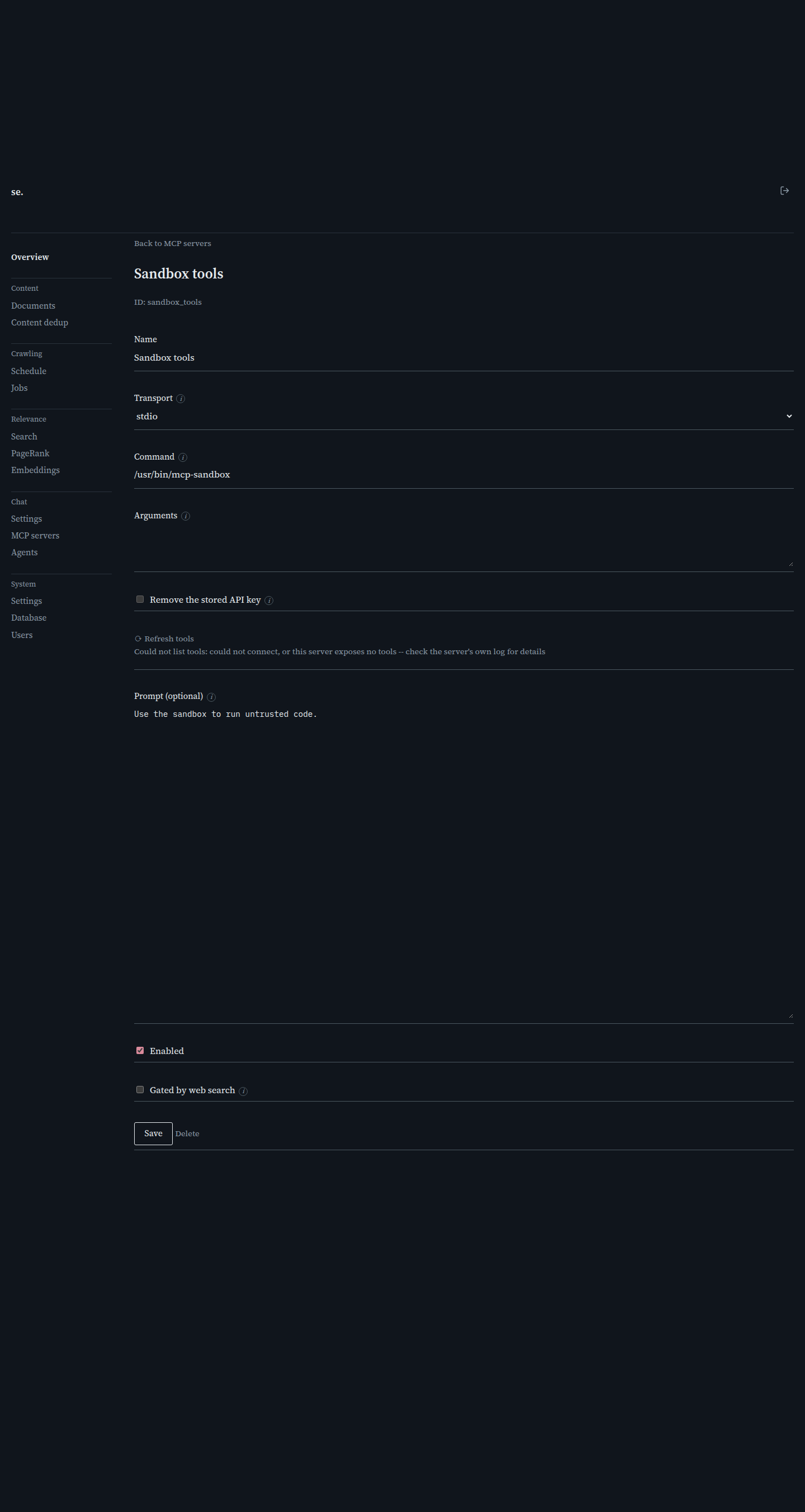
Name
A human label for this connection, e.g. “web tools” or “internal sandbox”. Shown only in this admin UI, never sent to the model, so it can be whatever’s clearest to you — unlike the tool names, which the server itself defines.
Transport: stdio vs http
Transport picks how this server is reached. “stdio” spawns Command as a local child process fresh at the start of each chat turn, talking MCP over stdin/stdout — what all four built-in servers use, and what any other locally installed binary needs too. “http” connects to a remote MCP endpoint over Streamable HTTP instead. Switching the dropdown shows only the fields that transport actually uses — Command/Arguments for stdio, Base URL/API key for http.
Command and Arguments (stdio only)
Command is the executable to spawn — an absolute path (e.g. /usr/bin/searchengine-mcp-web) or a name resolvable on this process’s PATH. It runs directly, never through a shell, so pipes or globs won’t work. Arguments are real argv elements, one per line: for mcp-sandbox, flags like -network (grant outbound network access, off by default — also unlocks a “packages” argument letting the model request pip/Go module installs, only possible with real network access), -system-packages (additionally let the model request OS-level packages — apt for run_python’s Debian-based image, apk for run_go’s Alpine-based one — only meaningful with -network, and a bigger privilege step than -network’s own “packages” alone: installing them happens in a separate, short-lived container with a writable root filesystem, whose result is committed into a throwaway image that the actual code then runs from under the sandbox’s completely normal lockdown, so installing packages and running the model’s own code never share a container), -memory/-cpus/-pids-limit/-timeout (resource limits), -dns/-host-dns/-host-network for DNS and networking mode when -network is set, and -base-url (search-server’s own base URL, defaults to http://127.0.0.1:8080, used to fetch a requested file_id’s bytes – independent of -network, see MCP Servers); for mcp-files, -base-url (defaults to http://127.0.0.1:8080). Every mcp-sandbox flag can also be set via a matching SE_SANDBOX_* environment variable (e.g. SE_SANDBOX_NETWORK, SE_SANDBOX_ALLOW_SYSTEM_PACKAGES) instead of Arguments, read the same way as any other environment-variable-configured setting — see Environment variables — though an explicit Arguments flag always wins over its env var. An admin filling in Command gets the same trust level as one configuring a crawl schedule or embedding endpoint — real trust, no extra sandboxing here, so only point it at binaries you actually trust.
Base URL and API key (http only)
Base URL is the remote MCP endpoint’s address, e.g. https://example.com/mcp. API key is optional, sent as an Authorization: Bearer header — leave blank if the remote server doesn’t require auth. Once saved, the key is encrypted at rest and never shown again; the field starts blank on reload, with placeholder text noting whether a key is stored. Leaving it blank on save keeps the existing key — check “Remove the stored API key” to actually remove one.
List tools / Refresh tools
Connects to the server exactly as the form is currently filled in — even unsaved — and shows real tool names/descriptions live. Runs automatically when an existing server’s page loads; re-run it after changing fields to sanity-check before Save. Zero tools is ambiguous (failed connection, or legitimately nothing exposed) and the status message says so rather than guessing; check the server’s log if unexpected. This is also the only place tool descriptions appear — they come from the server itself, never from anything typed here.
Prompt (optional)
Not where you describe what the server does — each tool’s own name and description (via List tools above) already tells the model that. Prompt is for extra cross-tool steering no single tool’s description can carry, e.g. “after searching, fetch results from different domains — not just the top-ranked ones — until you can validate the answer across independent sources; if a fetch is blocked, try a different domain rather than the same one again.” A fixed count (e.g. “fetch the top 3”) is the wrong shape for this: the top-ranked results can all share one domain, and if that domain blocks fetching, the model has nothing left to fall back to — a validation-based stopping condition survives that case, a fixed count doesn’t. When non-empty and the server is active, it’s injected as a system message after the chat endpoint’s persistent prompt (Chat -> Settings), in addition to it. Leave empty if tool descriptions already say enough; most servers don’t need one.
Enabled
Turns this server on or off. A disabled server is never connected to and its tools never offered, regardless of any other setting — the safe way to temporarily pull a server without deleting its configuration.
Gated by web search
When checked, this server (and its Prompt) is only active on a turn where the chat’s “Web” toggle is on — the same setting under Chat -> Settings, overridable per-question. There’s no separate control; it reuses that toggle. Unchecked (default), the server is active whenever Enabled is checked, regardless of web search. This lets a server like mcp-web run only when the user has actually asked for web-grounded answers.
Save and Delete
Save creates a new server (redirecting to its detail page) or updates an existing one’s editable fields — its ID, once minted from its name, never changes. Delete removes it outright after a confirmation warning its tools stop being offered immediately; no undo, so prefer unchecking Enabled if you might want it back.
Worth knowing:
- A stdio server’s Command is spawned fresh per chat turn, not left running as a background service — a crashing or slow-starting binary shows up as a per-turn failure, not a systemd outage.
- mcp-sandbox’s -network flag is off by default for good reason: enabling it (or -host-network, which shares the host’s network namespace) is a real privilege elevation for whatever code the model runs inside it.
← MCP Servers · ↑ Manual home · Agents →